
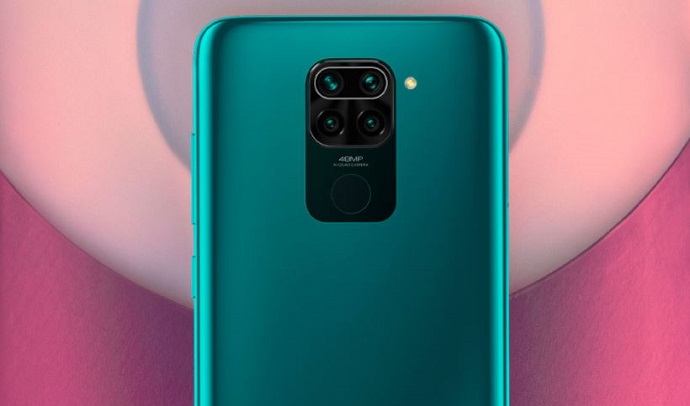
Xiaomi Redmi Note 9 Pro Max Dual Tips and Tricks
Xiaomi has launched the Redmi Note 9 Pro Max launched in India along with the Redmi Note 9 Pro. The Redmi Note 9 Pro Max comes with 6.67-inch full HD+ display with a resolution of 1080 x 2400 pixels with an aspect ratio of 20:9. It is powered by Octa-core Qualcomm Snapdragon 720G processor with Adreno 618 GPU. The Redmi Note 9 Pro Max is priced at Rs 16,999 for the 6GB RAM+ 64GB storage model, Rs 18,499 for the 6GB RAM + 128GB storage and the top model with 8GB RAM + 128GB memory with Rs 19,999. The smartphone sports a quad rear camera setup comprising a 64MP (f/1.9) main sensor, an 8MP (f 2.2) ultra-wide lens, a 5MP (f/2.4) macro camera, and a 2MP (f/2.4) depth lens. For selfies it packs a 32MP front-facing camera. The device runs on 5,020mAh battery with 33W fast-charging support.
The Redmi Note 9 Pro Max runs MIUI 12 based on Android 10. The device measures 165.5 x 76.68 x 8.8 mm (height x width x thickness) and weighs 209 grams. The Redmi Note 9 Pro Max comes in Aurora Blue, Glacier White and Interstellar Black color variants. This article will cover all the information related to tips, tricks and many more details about the device which will make easy for you to learn about the device, if you have purchased Redmi Note 9 Pro Max.
SIM Card Insertion
Redmi Note 9 Pro Max comes with Dual standby Dual VoLTE that accepts Nano-SIM and Nano-SIM cards. To insert the SIM, locate the SIM tray which is on either side of the phone. Insert the tool in that and a tray will pop out from your phone. Then place the SIM card downward facing and then re-insert it as it was. And then restart your phone and check the network. And you are done with the SIM card insertion.
Network Queries
Tethering Mode
Every device comes with internet sharing option which helps you to connect internet through USB/HOTSPOT/Bluetooth. If you want to share internet on Mi Note 9 Pro Max, open the settings and tap on Network and Internet. Then proceed on Hotspot and Tethering and tap on Wi-Fi hotspot and toggle the off button to enable that on your device. And also you can toggle the button adjacent to Bluetooth tethering/ USB tethering to share them.
Change Connectivity Options
Go to the Settings and tap on Mobile Network, then click on the Advanced and change the connectivity on your device. And you are done with the network connectivity options.
Hidden option on Redmi Note 9 Pro Max
Change wallpaper
Press on the blank screen and hold for a few seconds. A window will open then click on “Set Wallpaper”. You can choose from the option which is already mentioned there and select any of them and click on it. This is hidden option on your device to change the wallpaper. And the alternate option is just open the settings and click on display then tap on change wallpaper to change the wallpaper on your Mi Note 9 Pro Max smartphone.
Themes
Just same like wallpaper change option you just need to follow that procedure and click on “Themes” and select on any of the theme and click Apply.
One Handed Mode
Open the Settings, Click on Additional Settings and you will get the option as One-Handed Mode. In this option click on to Activate One-Handed Mode in your Redmi Note 9 Pro Max.
Facelock
To add a facelock on your device, open the settings, scroll down to the system & device section and tap on Lock screen and password. Select Add face data. Now you need to setup a backup password, PIN, pattern once you are done with this the next screen will appear, read the instructions on the screen and hit Next. Now, position your face in the middle of the oval. You will see a confirmation message after 5-10 seconds. Hit done to finish. It usually takes a few tries to get the face data saved successfully, so if it doesn’t work the first time, try again the same and it will work.
Fingerprint
To add a fingerprint on your device, open the settings and tap on Lockscreen and password and then tap on Manage fingerprints. Now you need to setup a backup password, PIN, pattern once you are done with this the next screen will appear, you need to register your fingerprint by placing your finger on the scanner. You need to put and raise your finger several times for successful registration. Once done, you will see a message popping as fingerprint added. Similarly you can also add more fingerprints to your device.
OTG Support
It comes with USB Port and it does support USB OTG.
Camera Options
Redmi Note 9 Pro Max boasts of a 64MP primary sensor, an 8MP wide-angle lens, a 5MP macro lens, and a 2MP depth sensor. For selfies, the smartphone has a 32MP in- display camera at the front.
Battery Options
Power Saving Modes and Uses
The handset is featured by 5,020mAh non-removable battery with support for 33W fast charging. To use the battery saver mode on your device, open the settings then tap on battery. In the new window, click on battery saver and toggle the button adjacent to Turn on automatically to enable that on your device.
Enable Battery percentage option
To enable the battery percentage option on Mi Note 9 Pro Max, open the settings and tap on battery. Then toggle the button adjacent to Battery percentage and enable that on your device. The Battery percentage is displayed beside the battery icon on the top right.
Miscellaneous on Xiaomi Mi Note 9 Pro Max
Charging Cable Options
The device comes with USB On-The-Go Type-C connector with a fast charging technology.
Developer Mode
Open the Settings on your device and scroll down and tap on About Phone. Tap on MIUI version for about 7-10 times. You will see a message saying “You are now a developer”. And now Developer Options is enabled on your device.
Does the device support Jio 4G Connectivity?
Yes, the device supports the Jio 4G connectivity.
Does the device support VoLTE?
Yes, the device supports the VoLTE for all the VoLTE available networks.
How to Add Google Network?
The general method is where you need to add the account while setting the device. And the alternate option is open the settings and click on Accounts. In the new window, click on Add Account and tap on Google. Enter the email id and password and you have successfully added the account on your smartphone. It will take around 3-5 minutes for all the google products to sync after the setup.
Is Xiaomi Mi Note 9 Pro Max water resistant?
No, Redmi Note 9 Pro Max is not water proof or water resistant.
Reset your Xiaomi Note 9 Pro Max
To reset the device, open the settings and tap on system. In the new window, click on Reset options and further tap on Erase all data (factory reset) and enter the lockscreen password. The device restarts and data is cleared on the smartphone.
How much Storage is available when you boot the device?
The device with 64GB as its internal storage but around 49.9GB of storage is available. Rest of the space is occupied by Predefined Apps and Android Operating system.
How much RAM is available when no apps is running in backend?
On an average around 1.6 GB of RAM is available out of total 3.8GB. So around 59% of RAM is used while applications are running in the background.
Type of the SIM supported on Xiaomi Mi Note 9 Pro Max
Mi Note 9 Pro Max is a dual SIM smartphone and supports Nano SIM card on it.
How to capture screenshot on Redmi Note 9 Pro Max
All you need to do is open the display that you would like to capture then hold the power key and volume down button and press them together. And your screen has been saved on your gallery. Also, you have an alternate option which is just open your display which you would like to capture then on your phone open the upper bar and you will see there something called “Screenshot” just tap on it and you are set to save your display which you wanted.
Does Redmi Note 9 Pro Max has fingerprint sensor
Yes, the device supports fingerprint sensor.
Does Redmi Note 9 Pro Max has Face Unlock
Yes, it supports Face Unlock.
Sensors on Redmi Note 9 Pro Max
The phone supports face unlock, fingerprint sensor, in-display fingerprint sensor, accelerometer, proximity, compass, ambient light sensor and gyroscope.
Hidden codes of Xiaomi Redmi Note 9 Pro Max
IMEI Info #06#
SAR Information *#07#*
If you still have any queries related to this smartphone then you can comment down below or tweet us @1howtothing.


